'%3e%3cpath%20fill='white'%20d='M12.2178%205.26343L15.3569%2012.7053L17.4812%2010.5404L12.2178%205.26343Z'%3e%3c/path%3e%3cpath%20fill='white'%20d='M5.27696%2022.7721L22.7721%205.27696L17.4951%200L0%2017.4951L5.27696%2022.7721Z'%3e%3c/path%3e%3cpath%20fill='white'%20d='M12.2178%205.27696L29.7129%2022.7721L34.9899%2017.4951L17.4947%200L12.2178%205.27696Z'%3e%3c/path%3e%3cpath%20fill='white'%20d='M54.9618%206.25116C55.4353%204.70867%2055.8413%203.38266%2056.2201%202.05666H56.3419C56.7478%203.40972%2057.1267%204.76279%2057.695%206.31881L60.0087%2013.8013H52.5533L54.9618%206.25116ZM54.3529%200.270613L47.1816%2022.4068H49.766L51.8227%2015.9662H60.7258L62.7825%2022.4068H65.4886L58.2768%200.270613H54.3529ZM79.2764%2022.4474H81.8066V2.55729H87.6789V0.270613H73.4041V2.5167H79.3034L79.2764%2022.4474ZM100.181%2022.4474H102.711V0.270613H100.181V22.4474ZM119.408%2011.271C119.408%204.38393%20121.749%202.27315%20125.348%202.27315C128.947%202.27315%20131.41%204.57336%20131.41%2011.5011C131.41%2018.4288%20129.11%2020.4989%20125.443%2020.4989C121.776%2020.4989%20119.408%2018.1852%20119.408%2011.271ZM133.994%2011.271C133.994%203.15264%20130.774%200%20125.524%200C120.274%200%20116.702%203.31501%20116.702%2011.5011C116.702%2019.6871%20119.895%2022.7721%20125.172%2022.7721C130.449%2022.7721%20133.94%2019.4571%20133.94%2011.271H133.994ZM152.937%2020.4989C150.862%2020.5138%20148.851%2019.7732%20147.281%2018.4152L145.793%2020.4313C147.733%2022.0331%20150.193%2022.8661%20152.707%2022.7721C157.443%2022.7721%20160.095%2019.9983%20160.095%2016.6427C160.095%209.87738%20149.541%2010.8922%20149.541%205.81818C149.541%203.80211%20151.084%202.3408%20153.681%202.3408C155.259%202.31464%20156.794%202.85197%20158.011%203.85624L159.554%201.89429C157.923%200.632155%20155.905%20-0.0274889%20153.844%200.0270606C149.866%200.0270606%20146.984%202.61141%20146.984%205.96702C146.984%2012.9488%20157.538%2011.8123%20157.538%2016.7915C157.443%2018.8482%20155.833%2020.4989%20152.829%2020.4989H152.937Z'%3e%3c/path%3e%3c/g%3e%3cdefs%3e%3cclipPath%20id='clip0_1060_39'%3e%3crect%20fill='white'%20height='22.7721'%20width='160'%3e%3c/rect%3e%3c/clipPath%3e%3c/defs%3e%3c/svg%3e)
 Christina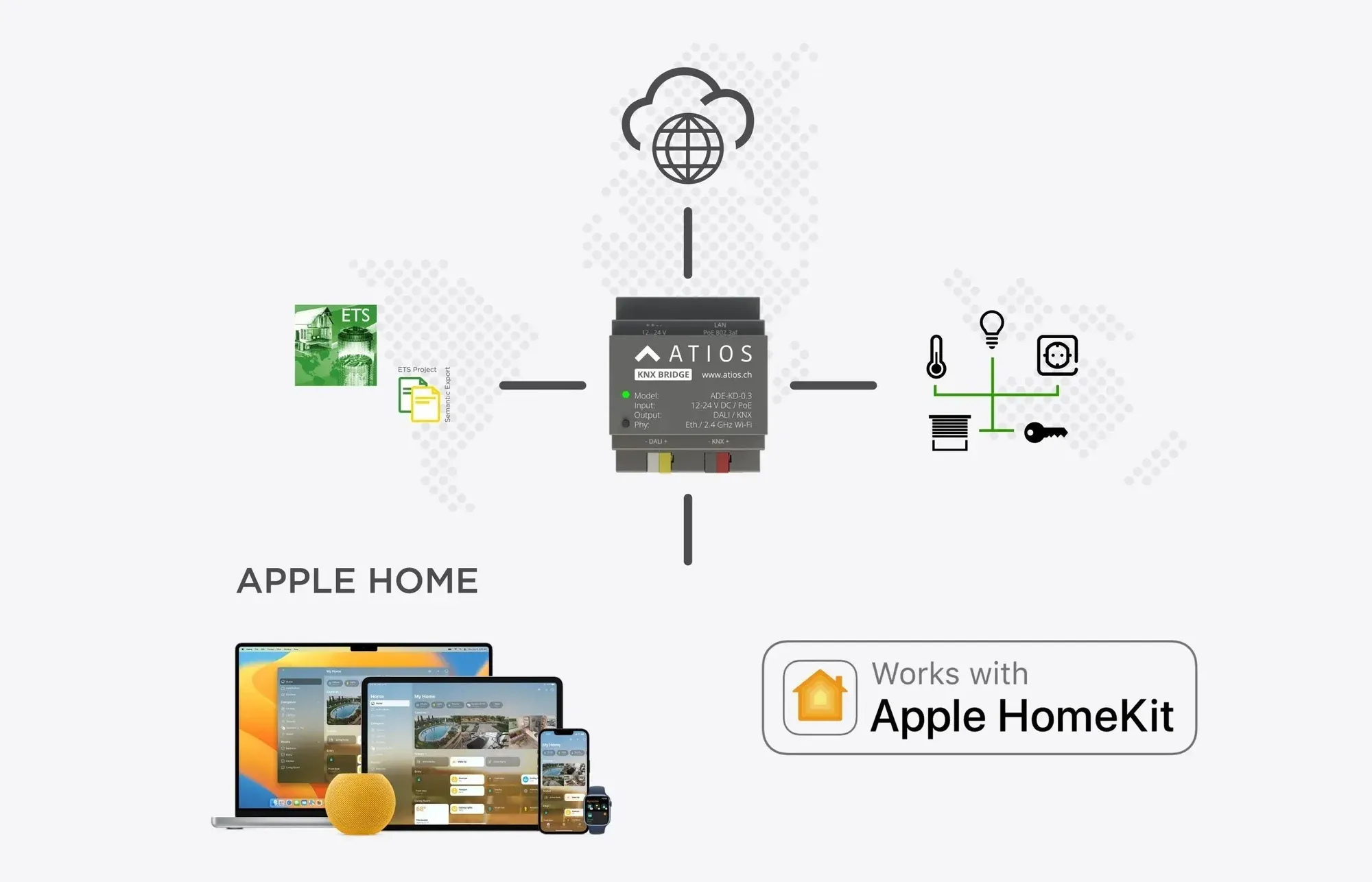
On this page
Smart homes are on the rise, and with Apple HomeKit they are now very user-friendly. But how do you plan a smart home with HomeKit from the ground up? This is where the KNX technology standard comes into play. Over 600 manufacturers worldwide offer proven KNX products that can easily be integrated into Apple HomeKit using the Atios KNX Bridge. Here you will learn everything about the technical side of KNX and how integration with Apple HomeKit works.
What is KNX?
KNX is the abbreviated form of KONNEX, derived from the Latin word “connexio,” meaning “connection.” KNX is a building automation standard continuously developed by the KNX Association. It is the global standard for complete building automation and has proven itself for over 40 years in all types of buildings—whether office buildings, airports, skyscrapers, smart homes, villas, or apartments.
The KNX standard enables the networking of all building system components, such as lighting, shading, heating and cooling, and alarm systems. This increases comfort and security while reducing operating costs through intelligent control—for example, automatically switching off heating when no one is home or lowering blinds during strong sunlight.
The technical side of KNX
KNX is based on a bus system. This is a dedicated data line that connects all devices within the KNX network—for example, light switches, blind controls, and alarm systems.
Devices in a KNX system
Devices in a KNX system can be divided into two categories:
Actuators
Actuators switch the power supply on or off, triggering a mechanism. They are connected to both the power line and the data bus so they can supply connected devices such as lamps or blinds with electricity and communicate with other devices on the KNX bus.
Sensors
Sensors monitor the environment and are also connected to the power supply and the bus line so they can communicate with other KNX devices. Examples include motion detectors, temperature sensors, and smoke detectors.
Sensors and actuators working together in the KNX system
Together, these sensors and actuators form the intelligence of the KNX system and make a home “smart.” Devices communicate with each other via the shared bus line, allowing individual control processes to be defined.
For example, actuators can be instructed to close windows and increase heating when a temperature sensor reports a value below a certain limit, or to switch off all lights when the last person leaves the building.
During installation, both the bus line and a conventional power line are laid. Every device connected to the bus can communicate with every other device on the same line.
This allows devices to be programmed centrally without needing fixed wiring for each interaction. Users can define individual control sequences and even program complex scenarios where multiple devices perform actions simultaneously.
Programming the KNX system
To ensure the KNX system controls devices as desired, it must be programmed. The KNX Association provides software called Engineering Tool Software (ETS). It is installed on a PC, and the programming is then transferred to the KNX installation.
Programming KNX via ETS can be complex and is usually carried out by professionals. In the next section, we explain how you can make changes easily yourself—without expert knowledge and without using ETS.
KNX and Apple HomeKit: A powerful combination
Once your KNX system is set up, it can easily be integrated into Apple HomeKit using the Atios KNX Bridge. The Apple Home app then serves as the user interface, allowing you to control devices such as lights and blinds and combine them into scenes and automations.
KNX and Apple HomeKit – ideal for new builds
The easiest way to implement full building automation with KNX and Apple Home is to plan it before construction begins. We plan your electrical installation and KNX system and provide all pre-programmed components and plans to your electrician for final installation.
This ensures that all KNX sensors and actuators are installed in the correct locations while the house is still under construction.
In addition to KNX push buttons (e.g., light switches), an iPad can be recessed into the wall as a central control unit. From there, all devices can be monitored and controlled, reducing the need for additional intercom or climate control panels.
Examples of a KNX system with Apple HomeKit
The KNX Bridge is connected to the home router via Ethernet. Smartphones on the same Wi-Fi network can communicate with the KNX system through the app. This allows users to adjust building automation settings without using the KNX software itself.
Modern smart home solutions offer much more than lighting control. Numerous components can interact to trigger actions in specific scenarios:
- When the smart doorbell rings, the user receives a notification and can unlock the door via app to let a delivery person place a package inside.
- If room temperature rises significantly due to sunlight, Apple Home can automatically lower the blinds and switch off heating in that room.
- When the first person arrives home or the last person leaves, lights can be activated or switched off automatically.
Can KNX be retrofitted in older buildings?
Retrofitting a KNX system involves significant effort. Since a bus line must be installed and actuators and sensors need to be integrated, opening walls is usually unavoidable—even with KNX RF wireless solutions.
However, we also offer Apple HomeKit-compatible retrofit solutions that do not rely on KNX. Our Wi-Fi or Thread wireless modules can be installed behind light switches or blind controls and easily integrated into Apple Home for convenient control.
Continue reading
Why Are We Passionate About Matter?
An engineering team’s honest answer.

You Designed the Customer Journey. Don’t Forget the Staff Journey.
A retail automation system is only as good as the experience of the people who use it every day.

The Home Office That Feels Like a Porsche Cockpit
Lighting, climate, one gesture.