'%3e%3cpath%20fill='white'%20d='M12.2178%205.26343L15.3569%2012.7053L17.4812%2010.5404L12.2178%205.26343Z'%3e%3c/path%3e%3cpath%20fill='white'%20d='M5.27696%2022.7721L22.7721%205.27696L17.4951%200L0%2017.4951L5.27696%2022.7721Z'%3e%3c/path%3e%3cpath%20fill='white'%20d='M12.2178%205.27696L29.7129%2022.7721L34.9899%2017.4951L17.4947%200L12.2178%205.27696Z'%3e%3c/path%3e%3cpath%20fill='white'%20d='M54.9618%206.25116C55.4353%204.70867%2055.8413%203.38266%2056.2201%202.05666H56.3419C56.7478%203.40972%2057.1267%204.76279%2057.695%206.31881L60.0087%2013.8013H52.5533L54.9618%206.25116ZM54.3529%200.270613L47.1816%2022.4068H49.766L51.8227%2015.9662H60.7258L62.7825%2022.4068H65.4886L58.2768%200.270613H54.3529ZM79.2764%2022.4474H81.8066V2.55729H87.6789V0.270613H73.4041V2.5167H79.3034L79.2764%2022.4474ZM100.181%2022.4474H102.711V0.270613H100.181V22.4474ZM119.408%2011.271C119.408%204.38393%20121.749%202.27315%20125.348%202.27315C128.947%202.27315%20131.41%204.57336%20131.41%2011.5011C131.41%2018.4288%20129.11%2020.4989%20125.443%2020.4989C121.776%2020.4989%20119.408%2018.1852%20119.408%2011.271ZM133.994%2011.271C133.994%203.15264%20130.774%200%20125.524%200C120.274%200%20116.702%203.31501%20116.702%2011.5011C116.702%2019.6871%20119.895%2022.7721%20125.172%2022.7721C130.449%2022.7721%20133.94%2019.4571%20133.94%2011.271H133.994ZM152.937%2020.4989C150.862%2020.5138%20148.851%2019.7732%20147.281%2018.4152L145.793%2020.4313C147.733%2022.0331%20150.193%2022.8661%20152.707%2022.7721C157.443%2022.7721%20160.095%2019.9983%20160.095%2016.6427C160.095%209.87738%20149.541%2010.8922%20149.541%205.81818C149.541%203.80211%20151.084%202.3408%20153.681%202.3408C155.259%202.31464%20156.794%202.85197%20158.011%203.85624L159.554%201.89429C157.923%200.632155%20155.905%20-0.0274889%20153.844%200.0270606C149.866%200.0270606%20146.984%202.61141%20146.984%205.96702C146.984%2012.9488%20157.538%2011.8123%20157.538%2016.7915C157.443%2018.8482%20155.833%2020.4989%20152.829%2020.4989H152.937Z'%3e%3c/path%3e%3c/g%3e%3cdefs%3e%3cclipPath%20id='clip0_1060_39'%3e%3crect%20fill='white'%20height='22.7721'%20width='160'%3e%3c/rect%3e%3c/clipPath%3e%3c/defs%3e%3c/svg%3e)
 Christina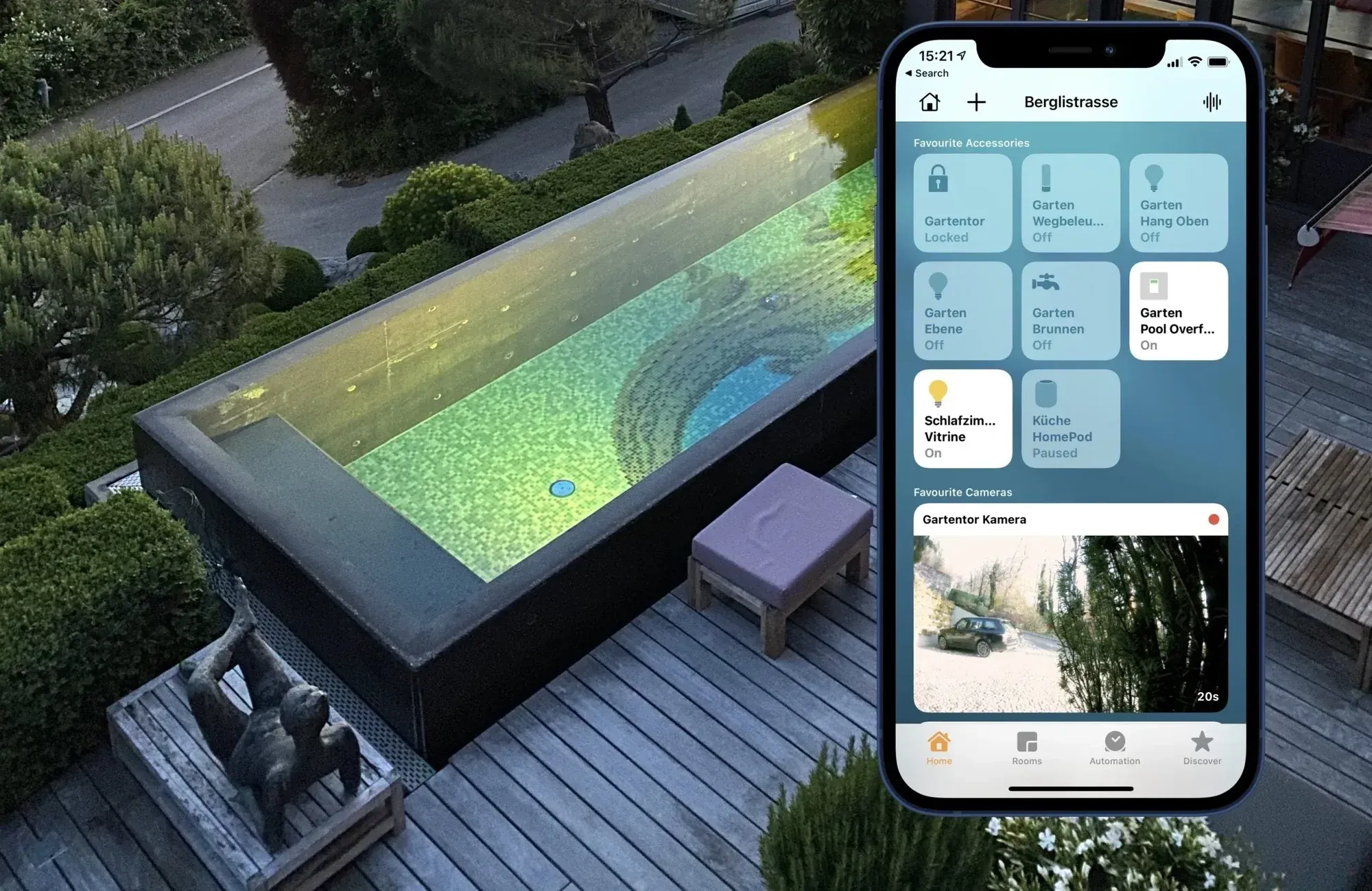
On this page
How does Apple HomeKit work?
Apple HomeKit brings together various devices from different manufacturers. The advantage is that instead of using multiple apps, all devices can be controlled via the Apple Home app. The prerequisite is that the devices are Apple HomeKit compatible. This is indicated by a “Made for HomeKit” label.
Using an iPhone or another iOS device, the different devices can be accessed via the Home app – either through touch input on the screen or by voice command using Siri.
Devices that are not HomeKit compatible or cannot be integrated via Wi-Fi
To communicate with the Home app, devices are either connected to the home’s Wi-Fi network or use another wireless standard such as Zigbee or Z-Wave. For the latter two, a gateway is required that connects to the home Wi-Fi or Ethernet network on one side and communicates with the devices on the other.
A gateway is also necessary if devices that are not explicitly HomeKit compatible are to be controlled via the Home app. A KNX bridge is often used as such a gateway, as we at Atios also develop.
What integration options are available for Apple HomeKit?
HomeKit-compatible products
Products that communicate directly with HomeKit are labeled accordingly. These are simply connected to the Wi-Fi network that the smartphone or iPad used to control the Home app is logged into.
This also makes it possible to make only individual devices smart. For example, there are smart bulbs such as Philips Hue. The corresponding Hue Bridge can be paired with the Apple Home Hub, allowing these lights to be controlled via the Home app instead of the app provided by Philips. This is especially advantageous if you have additional devices from different manufacturers. Instead of many manufacturer apps, you only need the Apple Home app for control.
Wired integration in new buildings
Anyone planning to build a house and automate the building can include Apple HomeKit integration from the start. With a KNX system, you have the greatest choice of products, as you are not tied to a single manufacturer.
The required control cables for the KNX system are installed in the walls together with the power cables, and the necessary sensors and actuators are mounted accordingly.
If you want to postpone automation for cost reasons, you should install empty conduits so that control cables can be retrofitted later without having to open the walls completely.
Retrofitting a smart home with Apple HomeKit
Devices, sensors, and actuators that are Apple HomeKit compatible and have Wi-Fi can be directly integrated into Apple HomeKit.
Products that are not labeled as Apple HomeKit compatible can be integrated via a KNX gateway, provided they support a compatible wireless standard. This makes it possible to retrofit building automation, for example in older buildings.
Many battery-powered sensors and actuators do not have Wi-Fi for energy-saving reasons. In this case, installing a KNX gateway becomes necessary. In older buildings, it makes sense to use a KNX RF solution to avoid running new cables in the walls. The wireless modules must be positioned so that they can communicate reliably with the KNX system. Therefore, installation location and range play an important role in a KNX RF system.
Example: Flush-mounted light switch for HomeKit
Smart light switches can be retrofitted relatively easily. They are installed flush-mounted. To do this, the switch box is removed from the wall and the smart light switch and corresponding wireless module are connected (or have them connected if you do not have experience with electrical installations). The wireless module then communicates with the KNX system, which in turn receives instructions from the Home app.
Compatible HomeKit devices
There is now a wide range of products that are compatible with Apple HomeKit and are clearly labeled as such. From everyday appliances like coffee machines or televisions to many other products, numerous devices can be integrated to make a house or apartment smart.
Products that are not labeled as Apple HomeKit compatible can still be integrated into the Home Hub. For this, a KNX system is required, which acts as a translator between HomeKit and the device to be controlled. This gives you the widest possible selection of products for your smart home and means you are not limited to HomeKit-compatible devices only.
Lighting and dimmers
Light switches and dimmers are classic devices that can be controlled via the Home app. For example, you can define rules for when lights should be turned on and off.
Especially in houses or apartments with many rooms, it is practical that all lamps can be controlled simultaneously. With the command “Hey Siri, turn off all lights,” you can skip manually checking whether every light has been switched off before leaving the house.
Blind and shutter control
Intelligent blind and shutter controls are also very practical, especially when combined with sensors. For example, a light sensor can automatically open or close a blind depending on sunlight. In summer, this helps prevent rooms from overheating due to constant sun exposure.
In the morning, shutters in the bedroom can automatically open at a specific time, and in the evening they can close again at your preferred time.
Air conditioning and heating
With intelligent thermostats, room temperature can be optimally regulated. In the Apple HomeKit settings, you can define the desired temperature for each room individually and specify the times at which it should be reached.
In winter, this means your home is already warm when you arrive. It also saves heating costs because the heating switches off once a certain temperature is reached or outside the defined time schedules.
In summer, the home remains pleasantly cool when temperature sensors continuously monitor room temperature and regulate the air conditioning accordingly.
Garage door, doors, and windows
Automating windows, doors, and garage doors is also possible with Apple HomeKit. Actuators are installed at the desired locations and can be controlled via the Home app. For example, the front door can be opened by voice command.
It is also possible to link devices with sensors. If a wind sensor detects strong winds, all windows can automatically close.
The interaction between multiple connected devices can also be configured with Apple HomeKit. For example, if windows are open in a room, the heating or air conditioning will only turn on once the windows are closed.
Continue reading
Why Are We Passionate About Matter?
An engineering team’s honest answer.

You Designed the Customer Journey. Don’t Forget the Staff Journey.
A retail automation system is only as good as the experience of the people who use it every day.

The Home Office That Feels Like a Porsche Cockpit
Lighting, climate, one gesture.